




Create AI videos with 240+ avatars in 160+ languages.
I’ve spent my whole career working in video, and even I find it hard to keep up with how fast AI video is evolving.
New AI video tools are constantly being launched, and while each one promises to deliver high-quality results, that’s not always the case.
Rather than rely on demos or hype, I’ve personally tested a range of the leading tools. I gave each tool the same prompt and assessed the video output for realism, motion, consistency, and more.
Check out the video below to quickly see the 12 best cinematic AI video generators compared side by side with the same prompt, and read on for my full review of each tool.
My ranking of the best AI video generators
Best AI video generators for cinematic videos:
These are the best AI video models for creative AI video projects:
- Veo 3: Most realistic visuals with strongest audio integration
- Seedance 2: Best motion physics and cinematic camera movement
- Kling 3.0: Most stable, controllable, production-ready cinematic generator
- Sora 2: Most advanced storytelling and narrative generation
- Runway Gen-4.5: Strong camera motion but weak detail stability
- Luma Ray3: Most beautiful UX with elegant visual output
- PixVerse 5.5: Best for short, dynamic, social-ready videos
- Grok Imagine: Most creative, imaginative, emotionally driven visuals
- WAN 2.6: Most reliable flexible tool for unrestricted prompts
- Pika 2.5: Playful, low-res tool for viral-style content
- Adobe Firefly: Strong image engine, weak video generation
- Hailuo 2.3: Outdated video quality, not competitive
Best AI video model aggregators:
To access a large selection of AI video models from one place (and one subscription), I use these tools:
- Higgsfield: Best all-round platform
- Krea: Best for automation workflows
- Freepik: Best for design workflows
Best AI video generators for work:
These are the best AI video creation platforms for practical and business use cases:
- Synthesia: Best for avatar-driven internal comms and training videos
- Creatify: Ultra-fast UGC-style ad generation from a single image
- Invideo: One-prompt marketing videos with strong storytelling but slow rendering
How I test cinematic AI video generators
I ran the same set of prompts through each of the cinematic AI video generators in order to generate a fair comparison.
My test prompt
“A cinematic aerial shot of a floating city above glowing clouds at golden hour. The camera follows a cloaked traveler riding a hovering speeder, weaving between crystal towers suspended in the air.
Below, rivers of light flow between floating islands with waterfalls pouring into mist. Airships drift past in the background, their metallic hulls reflecting sunlight and lens flare. Magic runes flicker on tower surfaces as drones circle.
The traveler’s cape ripples in the wind while the camera performs a smooth tracking orbit with natural motion blur and shallow depth of field. Soft volumetric rays pierce through the clouds, creating prismatic reflections.
Hyper-realistic textures (metal, glass, fog), cinematic teal-orange color grading, and a warm, atmospheric tone.”
My evaluation criteria
Once the tools had generated a video based on my prompt, I used this criteria to assess the outcome and make my judgements:
- Accuracy: Whether the video correctly follows the prompt, without missing any elements or adding hallucinations
- Realism: How believable the visuals and physics are of the video content, including lighting, textures, and motion
- Consistency: If the objects, motion, and details hold together in a stable way across frames
- Creativity: How the tool interprets the prompt making it more interesting or engaging
- Audio quality: If the sound is clean and synced to the video content
- Performance: How long the tool took to generate the video and how streamlined the user experience was
- Constraints: If there were limitations around clip length, cost, access, and other factors
Comparison table
1. Veo
How to get access
- Try Veo 3 via Flow [FREE]
- Try Veo 3 via Synthesia's AI Playground [FREE]
- Buy a Google AI plan [PAID]
- Use an AI video model aggregator [PAID]
Quick summary
- Best for: Cinematic realism with strong integrated audio
- Max resolution: Up to 4K
- Max clip length: ~6–8 sec
- Generation time: ~5–7 min
- Audio: Yes, clean and well-synced
My experience
Pros
Veo follows prompts really well. The model followed my prompt precisely and without creating hallucinations or visual drift.
On top of that, the output is also highly detailed, visually rich, and atmospherically cohesive. I was also impressed by its cinematic interpretation.
The audio is clean and well-matched to the events that happen on screen. I’d even say that the audio is noticeably clearer than Kling’s sound generation.
Cons
The main limitation I had with Veo was the camera dynamics. At times, movement felt slightly restrained.
The clip duration is also short, particularly considering the high cost of the tool. Plus, there are some regional access restrictions for the tool which means needing to use a VPN.
My verdict
Veo is definitely one of the strongest text-to-video results currently available, especially in terms of prompt fidelity, aesthetic quality, and sound–visual synchronization. I’d recommend Veo for filmmakers, storytellers, designers working on premium narrative or branded visuals.
2. Seedance
How to get access
- No free access available yet
- Via Dreamina/CapCut [PAID]
- Use an AI video model aggregator [PAID]
Quick summary
- Best for: Cinematic motion and camera dynamics
- Max resolution: 720p
- Max clip length: ~15 sec
- Generation time: ~2–3 min
- Audio: Yes (environment + music, well synced)
My experience
Pros
Seedance showed outstanding camera motion dynamics during my test. It had a strong shot composition and particularly exceptional object physics. The drones behaved stably and the propellers moved naturally without deforming. Seedance had one of the best physics simulation results among AI video models that I tested.
The lighting is also highly realistic. Sunlight reflections on transparent and metallic surfaces responded dynamically to scene movement, creating a strong cinematic realism effect.
The integrated audio generation enhanced immersion, too. Flying objects had individual audio layers, the musical score matched the scene’s mood, and the overall quality of the audio was comparable to tools like Kling and Grok.
Cons
Access to Seedance is currently restricted to business-tier plans – a corporate email is even required to sign up. The resolution is limited to 720p and the prompt sensitivity can be slightly inconsistent.
My verdict
In my opinion, Seedance has made big advances in AI video generation. Unlike earlier versions of the tool, it no longer feels experimental, it behaves more like a true cinematic production tool. The combination of motion physics, camera intelligence, and synchronized audio creates results that feel closer to film sequences than AI experiments.
3. Kling
How to get access
- Try Kling with free monthly credits [FREE]
- Use an AI video model aggregator [PAID]
Quick summary
- Best for: Controlled cinematic video generation
- Max resolution: 1080p
- Max clip length: ~15 sec
- Generation time: ~4–7 min
- Audio: Yes (improved, well synced)
My experience
Pros
Kling has exceptional accuracy. In my test, the tool followed my prompt closely, with no missing details, unexpected elements or hallucinations. The output was controlled and predictable.
Realism is great; particularly for lighting, physics, and environmental behavior. Motion, reflections, and material response feel grounded, and I’d say Kling is one of the most stable AI generators I’ve used.
Cons
Creativity is more restrained in Kling 3.0 compared to earlier versions of the tool. The latest release prioritizes stability and prompt accuracy over experimental outputs, which makes it reliable but less expressive.
Moving objects like drones can show some slight distortion, and generation times are noticeably longer when working with detailed scenes.
My verdict
Kling 3.0 offers clean, controlled production. Its videos are cinematic, with smooth camera motion, and a clear sense of scene structure. Compared to tools like Runway, Kling delivers stronger realism and more believable physics. Compared to Veo, it offers more flexibility in camera movement and scene control. Audio and emotional realism, however, are not as strong as some of Kling’s competitors.
Kling is a reliable and production-ready AI video tool for high-quality cinematic output with good control. You may have to sacrifice some creative flair with it, though.
4. Sora 2
How to get access
- Try Sora 2 via Synthesia's AI Playground [FREE]
- Use an AI video model aggregator [PAID]
- Note: Sora 2 completely shuts down on 09/24/2026
Quick summary
- Best for: Narrative storytelling and multi-scene video
- Max resolution: Up to 1080p
- Max clip length: ~4–12 sec
- Generation time: ~9–10 min
- Audio: Yes (dialogue + sound generation)
My experience
Pros
Sora 2 recreated my prompt perfectly – it was cinematic, emotional, and brilliant. The character’s flight sequence looked natural, with realistic light behavior, fabric physics, and world depth that made it feel like a fully built environment, not just a fragment. Even at 720p, the overall quality looked near film-grade.
The storytelling in general is next level with Sora. The light, physics, camera movement, and dialogue all feel human-directed. It creates the feeling of world-building, not just short clips, and I think it’s the only tool that can generate multi-scene narratives with dialogue and atmosphere.
Cons
Rendering is very slow at around 10 minutes per video. Sora also doesn’t have many editing tools or collaborative features, and (once again) access is limited.
Background sound is automatically added to videos and can generate realistic voices for characters, however, the quality still isn’t perfect.
My verdict
Sora feels like a cinematic engine – its performance is reliable, the results are stunning, and updates are frequent. It’s a shame that the tool will be shutting down because it really could redefine how creators, studios, and educators use AI in storytelling.
Until then, I highly recommend Sora for character-driven narratives or fantasy scenes, emotional concept visualization, and viral or entertainment content using templates.
5. Runway
How to get access
Quick summary
- Best for: Camera motion and creative workflows
- Max resolution: 720p
- Max clip length: ~10–12 sec
- Generation time: ~5+ min (text-to-video)
- Audio: No native audio in video generation
My experience
Pros
Runway really stands out for its camera work. The smooth tracking movement following the character in my video felt cinematic from the very first seconds, and is one of the strongest camera implementations I’ve seen during my testing.
The model followed my prompt fairly well in terms of composition and overall visual concept. The traveler was clearly established as the main character, with a readable silhouette and consistent motion. I’d say that camera movement felt deliberate and well-directed.
Cons
Image detail quality was a major weakness. During camera motion, excessive blur would appear, fine detail would collapse, and objects became distorted. World physics were average – scenes felt believable at a glance but closer inspection revealed simplification and instability.
In general, the output with Runway seemed more like an old video game cinematic rather than a film-level render. It may be a good tool for mood boards or concept exploration, but its use seems limited to commercial or realism-driven projects.
My verdict
The output with Runway was conceptually promising but the technical instability limited its practical value for me. The cinematic camera motion is great, but I think Runway is behind other top-tier competitors when it comes to execution quality.
6. Luma
How to get access
- Try Luma Dream Machine [FREE]
- Use an AI video model aggregator [PAID]
Quick summary
- Best for: Aesthetic visuals and artistic scenes
- Max resolution: Up to 4K (tested via Firefly)
- Max clip length: ~5–10 sec
- Generation time: ~2–7 min depending on mode
- Audio: No native audio
My experience
Pros
Luma is an aesthetic joy. The interface is well designed and intuitive. It offers camera controls, motion settings, aspect ratio, effects, and transitions. There’s also a separate modify editor, where you can upload videos or images to reframe, upscale, or even generate audio.
The results from my prompt looked creative and beautiful, but the motion detail struggled, especially during fast camera movements or character actions. That said, when I tested fantasy nature scenes (like plants and landscapes), Luma performed well, producing delicate, precise, and elegant outputs. I’d say that the model handles calm or surreal visuals better than dynamic motion.
Cons
There’s no audio integration with Luma, which is a shame considering its ability to generate fantasy settings.
Luma is also expensive, especially given its limitations around stability during motion and its average physics simulations. The tool is aesthetically impressive but motions can get messy and can objects blend together unnaturally.
My verdict
Luma has evolved into a sleek, reliable, design-driven platform. While it’s not built for high-action or dialogue scenes, it shines in atmosphere, emotion, and visual storytelling. It’s a tool for artists, designers, and creators focused on cinematic mood and beauty rather than technical video editors.
7. PixVerse
How to get access
- Try PixVerse (free daily credits) [FREE]
Quick summary
- Best for: Short-form cinematic and social content
- Max resolution: 1080p
- Max clip length: ~5–6 sec
- Generation time: ~1–2 min
- Audio: Yes (basic, built-in)
My experience
What I liked most: Creativity, accuracy
Pros
PixVerse gave me a convincing atmospheric result in my test. The tool followed the prompt well, especially in terms of mood, composition, and overall visual storytelling. A pleasant surprise was that the main traveler character appeared as a woman, adding a layer of visual interest and diversity without breaking prompt intent.
Camera dynamics are one of PixVerse’s strong points. The motion feels energetic and engaging, and compared to V5, the prompt understanding and aesthetic interpretation have clearly improved.
Plus, the city in the scene felt larger and more impressive than I’d intended, which contributed to a cinematic sense of scale. Generation speed is solid too: under two minutes for five seconds of video.
Cons
During sharper camera movements, physical stability starts to break down with PixVerse. Objects blur, fine details are lost, and physics becomes less convincing. For a 1080p output, color depth and micro-detail felt slightly underwhelming. I’d have liked more detail at this resolution.
Video length is capped to six seconds maximum, and the audio quality seemed quite low, almost unclean.
My verdict
PixVerse prioritizes mood, motion, and accessibility. I’d use it for viral content, social media videos, and quick promotional visuals, but not as a daily production tool.
8. Grok Imagine
How to get access
- No free video generation
- Buy a Grok plan [PAID]
- Use an AI video model aggregator [PAID]
Quick summary
- Best for: Creative concepts and cinematic mood
- Max resolution: 720p
- Max clip length: ~15 sec
- Generation time: ~1.5–2 min
- Audio: Yes (music + ambient, well integrated)
My experience
Pros
Unlike tools focused strictly on realism, Grok Imagine approaches prompts with an almost artistic interpretation. The result it gave me felt imaginative and visually bold. Lighting work is particularly impressive, including reflections across architectural lettering, glowing environments, and dynamic illumination transitions.
Visually, the scene felt modern, polished, and professionally composed. Interestingly, the drone design was more creative than in Kling, and Grok Imagine took more liberty to create a fantasy world, which – although it had some deviations in accuracy – boosted the overall storytelling.
One of the most impressive aspects is audio implementation. Grok Imagine generated two synchronized audio layers for me: environmental ambient sounds matching the scene and cinematic musical score aligned with narrative tone.
Cons
The downside to Grok Imagine is its resolution. Another 720p tool, there’s occasional blurring in fine details. Additionally, there’s not as much predictable stylistic control as with other tools. The fantasy world worked for my prompt, but may not align with other users’ specifications.
My verdict
Grok Imagine is an extremely creative AI video generator. The tool prioritizes imagination and artistic interpretation over strict realism. And while stability and detail consistency don’t match other top cinematic generators, Grok produces very compelling results.
9. Wan
How to get access
- Try Wan with daily free credits [FREE]
- Use an AI video model aggregator [PAID]
Quick summary
- Best for: Reliable generation and flexible prompts
- Max resolution: 1080p
- Max clip length: ~5–15 sec
- Generation time: ~1–5 min
- Audio: Yes (basic, with artifacts)
My experience
Pros
Wan is a reliable tool. It has good camera motion and idea execution, and very low prompt sensitivity. It comes with built-in audio support, and can produce video clips that are longer than other tools (up to ~15 seconds).
In terms of pricing, Wan is also much more accessible than other AI video generator models.
Cons
The visuals with Wan can be stylized, looking almost cartoon-like. It features weak objects in the video and the audio lacks any realms. The editing and control tools are limited as well.
My verdict
WAN doesn’t try to be a fancy tool. Instead, it’s dependable, flexible, and practical, and offers access to AI video where other models don’t. If you need a reliable creative companion that lets you finish ideas without censorship roadblocks, WAN is a solid ‘work horse’ platform.
10. Pika
How to get access
- Try Pika with free monthly credits [FREE]
Quick summary
- Best for: Viral clips and social content
- Max resolution: 480p on free plan
- Max clip length: ~5–10 sec
- Generation time: ~2–4 min
- Audio: No
My experience
Pros
Pika has a strong focus on viral, attention-grabbing visuals. It has a good color grading and atmosphere, and a fast and expressive creative sandbox. The model followed my prompt well, and my visual idea was communicated clearly.
Pika is expressive and playful, and because it’s free to access, it’s a good choice if you want to experiment with, or test, AI videos.
Cons
The output feels far from cinematic with Pika. Motion physics are simplified, and the image lacks depth and realism. The tool prioritizes visual impact over physical accuracy, and the resolution is very low on the free plan (480p).
There’s no audio support via Pika, physics and object stability are weak, and the overall output isn’t suitable for cinematic nor commercial-grade output.
My verdict
Pika works best as a creative playground, not a professional studio. It’s fast, expressive, and ideal for influencer-style content, visual experiments, and playful storytelling. However, it doesn’t have the depth, realism, and control required for polished cinematic work.
11. Adobe Firefly
How to get access
Quick summary
- Best for: Adobe ecosystem and concept visuals
- Max resolution: 1080p
- Max clip length: ~5 sec
- Generation time: ~60–75 sec
- Audio: No (separate generation only)
My experience
Pros
Adobe Firefly is fast – it took about a minute to generate my video, which is impressive compared to other tools’ time.
The platform is naturally connected to the Adobe ecosystem, which was great for experimenting with things like motion studies and marketing-style visuals.
Cons
The interface feels cluttered and a bit overloaded; in my view, there’s a lot that could be simplified. Moreover, the video result didn’t impress me. Both the quality and prompt execution felt disappointing for what I would expect Adobe to be able to achieve.
My verdict
I would recommend Adobe Firefly as a creative sandbox but since the realism, motion control, and emotional tone aren’t up to par, I wouldn’t recommend it for final cinematic projects.
12. Hailuo
How to get access
Quick summary
- Best for: Image concepts and stylized visuals
- Max resolution: 1080p (lower for longer clips)
- Max clip length: ~6–10 sec
- Generation time: ~3–12 min depending on mode
- Audio: No
My experience
Pros
Image generation is strong with Hailuo. The color grading and certain elements like fabric movement look interesting with the tool. Atmosphere is also created well in videos.
Accuracy was fine, Hailuo followed my prompt as expected.
Cons
Unfortunately, there are quite a lot of shortcomings with Hailuo. The video output feels outdated – there’s minimal camera movement, weak visual direction, and weak motion and lighting. Overall, the scene quality feels behind current standards, resembling older game-like visuals, not cinematic content.
Scenes are stable enough to complete, but the details and dynamic behaviors just weren’t there. Scenes ultimately ended up appearing static and lacking in realism.
No audio ties the negative experience together. The output feels incomplete without sound, and compared to other tools available, places Hailuo as outdated.
My verdict
Hailuo has some creative potential in image generation, but its video capabilities are not yet up to par.
AI video model aggregators
The main way I tested the tools listed in this article was using AI video model aggregators. These platforms gave me access to multiple AI video models in one place. So, instead of relying on a single model, I was able to experiment across tools and select the best video result(s).
For me, the advantages of AI video aggregators are:
- Efficiency: Test tools and compare video output in one environment, which makes it much easier to select the best generated video and iterate quickly. And for professional purposes, select the AI video generation platforms that have the most compatible workflows and automation for their organization.
- Cost savings: Many AI video aggregators charge credits for video generation, but they’re still more affordable than subscribing to multiple tools.
Here are my 3 favorite AI video aggregator platforms:
1. Higgsfield
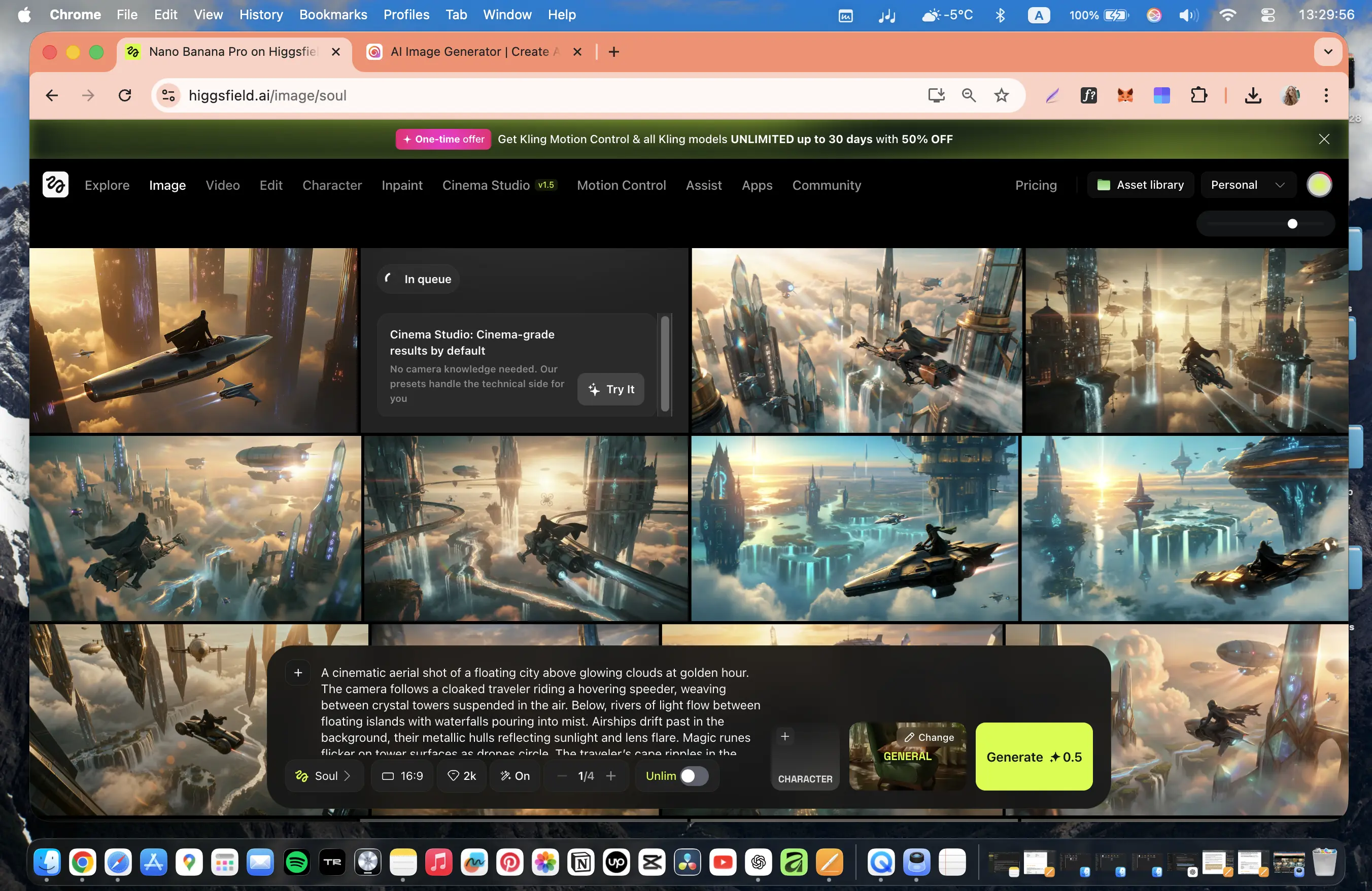
Higgsfield is the most convenient and powerful AI aggregator I’ve used – which is why I’ve used it daily for almost two years.
It combines the largest selection of AI image and video models, an outstanding user interface, unlimited AI photo generation (on the Ultimate plan for $49/month), and incredibly fast access to new models, often with free, unlimited testing windows.
I use Higgsfield for everything: short films, advertising videos, creative experiments, interior design visuals, AI influencers, and branded content.
For creators who want multiple AI tools in one professional workspace, Higgsfield is currently unmatched.
2. Krea
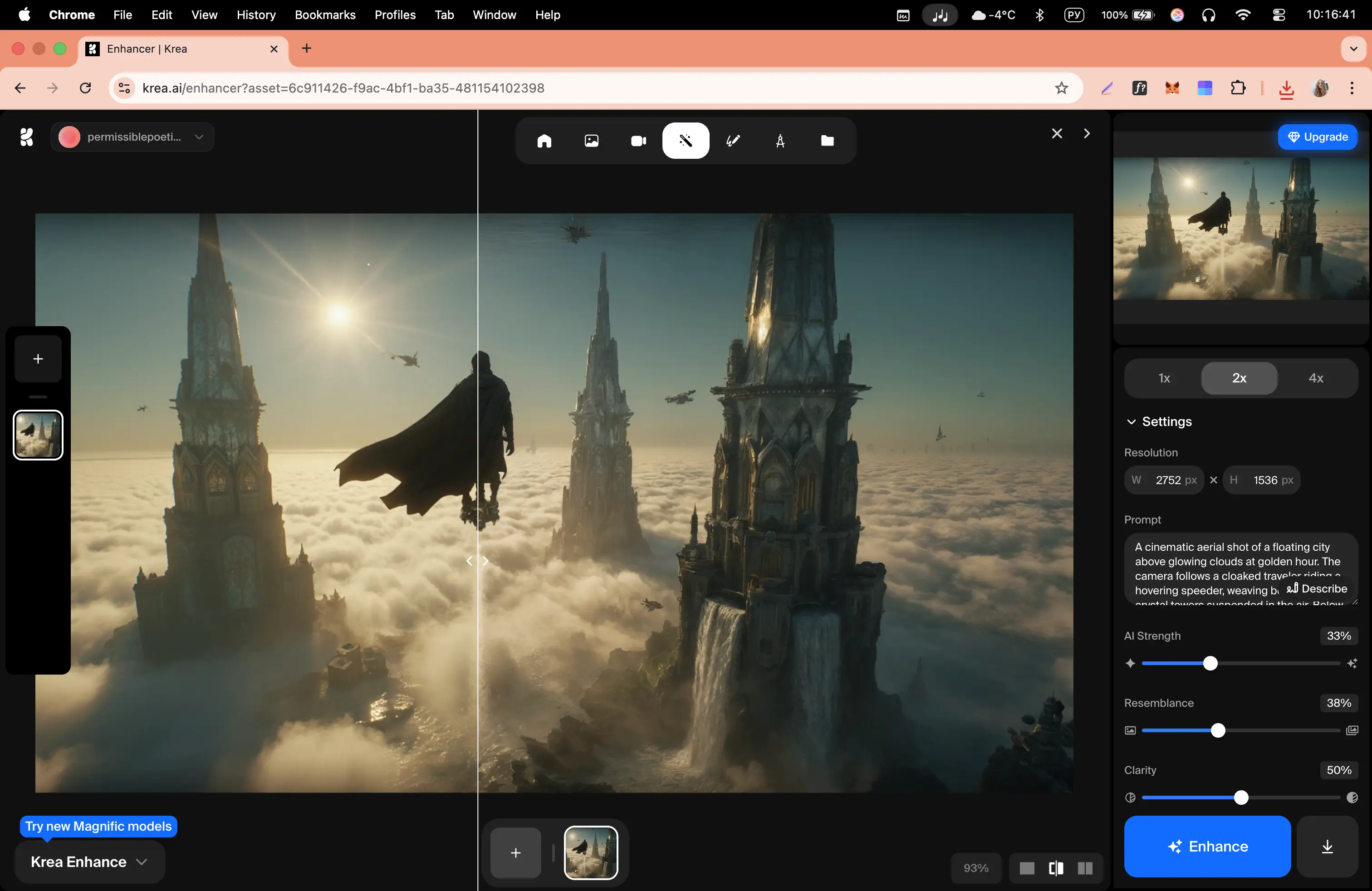
Krea is a powerful, minimalist AI aggregator focused on serious creative work rather than trends or entertainment. It offers an impressive number of image, video, 3D, motion, and automation tools, including advanced features like node-based workflows and mini apps, which I haven’t seen implemented this way in other aggregators.
While it doesn’t replace Higgsfield for my daily work (mainly due to pricing and the lack of unlimited Nano Banana Pro), Krea clearly stands out as a mature, professional platform for creators, studios, architects, and teams working with repeatable pipelines and automation.
3. Freepik
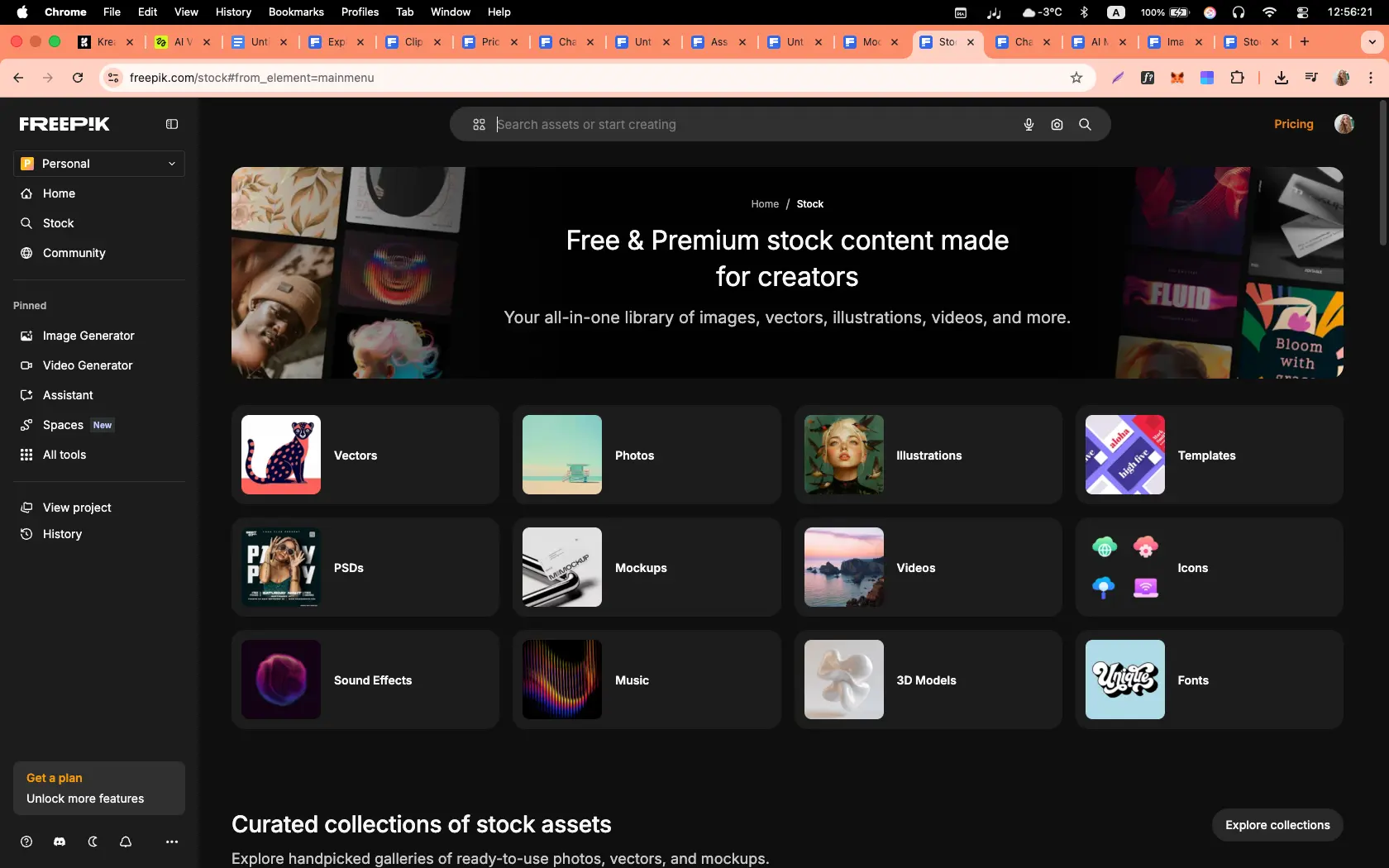
Freepik unexpectedly became one of the best AI aggregators I’ve tested so far. What started as a stock platform has evolved into an all-in-one AI workspace for designers, videographers, and creative professionals.
The combination of top-tier image and video models, node-based workflows, unlimited AI image generation, design-focused tools, and a very clean UI makes Freepik a contender for my next main working platform.
The best AI video generators for work
Here are my three favourite AI video generators for work, with each one covering a different use case.
1. Synthesia
How to get access
- Try Synthesia [FREE]
Quick summary
- Best for: Training, onboarding, internal communications, sales enablement, and localized content
- Output types: Avatar-led videos
- Languages: 160+ with built-in translation
My experience
Synthesia is a phenomenal tool. The English avatar realism is astounding – the people have strong, natural facial expressions, the lip syncing is stable, and the gestures are all to a professional standard.
What I particularly enjoyed was the control and editing capabilities. I could review scenes, messaging, and layouts, and generate multilingual translations easily.
The workflow is straightforward. I uploaded a document or a script, selected an avatar and voice, and then generated the video. I could also use the AI video assistant to help me iterate videos. Not to mention there are AI B-roll options from Veo and Sora available directly from the Synthesia AI video generator tool.
My verdict
I think Synthesia makes sense for businesses who are short on time. Being able to turn scripts, documents, webpages, or slides into presenter-led videos without filming – and still keep everything consistent and on-brand across teams – is a huge help in 2026.
Rendering can take several minutes but I think the output is worth the wait. And, the collaboration tools, brand kits, and version control mean users can easily scale their video content.
2. Creatify
How to get access
- Try Creatify [FREE]
Quick summary
- Best for: UGC-style ads, performance marketing, rapid ad testing
- Output types: Avatar-led ads, product videos, image ads
- Input: Product image, brand info, basic description
My experience
Creatify can generate full advertising content from a single image, extremely quickly. It can make AI creators, scripted advertisements, subtitles, marketing positioning, multiple video variations, and ready-to-publish social media content.
From a business perspective, Creatify is fantastic because it immediately produces content at volume, which most brands want to help with visibility, testing speed, and advertising iteration.
It additionally has a powerful avatar system, integrated editing workflow, and direct ad platform integration.
My verdict
Creatify addresses the need for large volumes of marketing content. It works for businesses that want to generate an entire advertising ecosystem from one image within minutes.
3. Invideo
How to get access
- Try Invideo [FREE]
Quick summary
- Best for: Generating full marketing videos from a single brief
- Output types: Social media ads, product videos
- Input: Text brief, product details, images
My experience
The feel of Invideo impressed me the most. From a single description, the platform produced: a structured marketing narrative, AI scenes, product demonstrations, and social media-ready content.
Many of the generated scenes looked surprisingly believable and aligned well with my intended advertising message. There was also automatic scripting and realistic product placement. All in all, the result genuinely felt like a premium-level social media commercial.
My verdict
I genuinely liked using Invideo. The tool shows how AI video production is moving toward a new workflow where a single detailed brief can produce a professional marketing video. Despite some generation delays and minor imperfections, the platform already enables high-quality advertising content and saves huge amounts of time.

Kyle Odefey is a London-based filmmaker and Video Editor at Synthesia. His content has reached millions across TikTok, LinkedIn, and YouTube, even inspiring an SNL sketch, and has been featured by CNBC, BBC, Forbes, and MIT Technology Review.




Frequently asked questions
What’s the best AI video generator for business use cases like training, onboarding, and internal comms?
Synthesia. It turns scripts and docs into presenter-led videos with realistic avatars, 1-click translation, LMS exports, brand kits, and team workflows. If you want extra B-roll, pair Synthesia with Veo 3 or Sora 2 clips inside the same project.
What’s the best AI video generator for cinematic short films and emotional storytelling?
Veo 3 and Seedance 2 for the most natural acting, lighting, and camera language. If you have access, Sora 2 is excellent for multi-scene narrative flow. For strong results at a saner price, Kling is the practical alternative.
What’s the best AI video generator for fast social ads with sound in one tool?
PixVerse. Quick renders, built-in audio and optional speech, solid prompt control, and handy features like Fusion and Swap. Runners-up: Runway (great polish and 4K upscale) and Seedance for clean, stable motion.
What’s the best budget-friendly AI video generator for quick, reliable output?
Wan. Very low cost for short 720p/1080p clips, fast, and stable. Consider Seedance for similarly clean, dependable motion, and PixVerse off-peak pricing when you also want audio.
What’s the best AI video generator for product demos and app promos?
Runway. Excellent UI, strong image-to-video, scene expansion, and 4K upscale. If you’re starting from high-quality stills, Seedance or Kling add smooth motion and good physics.
What’s the best AI video generator for fashion, perfume, or mood-driven brand visuals?
Hailuo for gorgeous lighting, texture, and cinematic feel when atmosphere matters most. Luma Dream Machine is a close second for elegant, dreamy aesthetics and a great UX. For fast, artsy sketches, Grok Imagine is interesting.
What’s the best AI video generator for YouTube explainers and tutorials?
Synthesia. Presenter-led formats, clear voice options, templates, on-brand visuals, and translations make repeatable explainer production easy. Add Runway or PixVerse for quick B-roll, motion accents, and sound.
What’s the best AI video generator for multilingual localization at scale?
Synthesia. It handles 160+ languages with 1-click translation, natural voices, localized avatars, and LMS-friendly exports—perfect for turning one master video into many regional versions. For on-brand visuals, layer in Veo 3 or Sora 2 B-roll where needed.


